ThemeLooks Support Team

Forum Replies Created

Viewing 15 posts - 2,506 through 2,520 (of 5,045 total)
  • Author
    Posts
  • in reply to: Blog About Date #7060

    Hi There,

    Please check this link to change the date format https://www.wpbeginner.com/beginners-guide/how-to-change-date-and-time-format-in-wordpress/

    Best Regards,
    ThemeLooks Support Team

    in reply to: Social Whatsapp #7059

    You are welcome!

    in reply to: Social Whatsapp #7055

    Please add below code in the ecohost-option.php file afte line number 842 from inc\eco-framework\eco-option folder to get the option in theme option.

    
                array(
                    'id'       => 'eco_whatsapp_link',
                    'type'     => 'text',
                    'title'    => __( 'Whatsapp', 'ecohosting' ),
                    'subtitle' => __( 'Add Whatsapp URL', 'ecohosting' ),
                ),

    Best Regards,
    ThemeLooks Support Team

    in reply to: How to Make Domain Search Bar Work? #7053

    Hi Abdullah,

    It’s a WHMCS update issue. They don’t allow to redirect the search query to the WHMCS after their update by changing their domain search method. In this issue, you could contact WHMCS support to learn more about this issue.

    Best Regards,
    ThemeLooks Support Team

    in reply to: Social Whatsapp #7048

    Please add this below code to the line number 303 in the ecohost-functions.php file from inc folder.

    <?php if( ecohost_opt('eco_whatsapp_link')  ): ?>
            <li <?php echo wp_kses_post( $li_class ); ?>><a href="<?php echo esc_url( ecohost_opt('eco_whatsapp_link') ); ?>" target="_blank" <?php echo wp_kses_post( $aclass ); ?>><i class="fa fa-whatsapp"></i></a></li>
        <?php endif; ?>

    Best Regards,
    ThemeLooks Support Team

    in reply to: Social Whatsapp #7045

    Hi Kaan,

    We are sorry to say that based on the theme UI/UX there has no WhatsApp icon to provide WhatsApp link for the Social Menu. This is because WhatsApp is not a social media. It’s just a messaging app.

    Best Regards,
    ThemeLooks Support Team

    in reply to: Domain Page not pushing Search to WHMCS page. #7041

    Hi WB,

    Your website is in the coming soon mode and we are unable to assist you on this issue without reviewing the issue on your website.

    Please confirm to us when your website will live to review.

    Best Regards,
    ThemeLooks Support Team
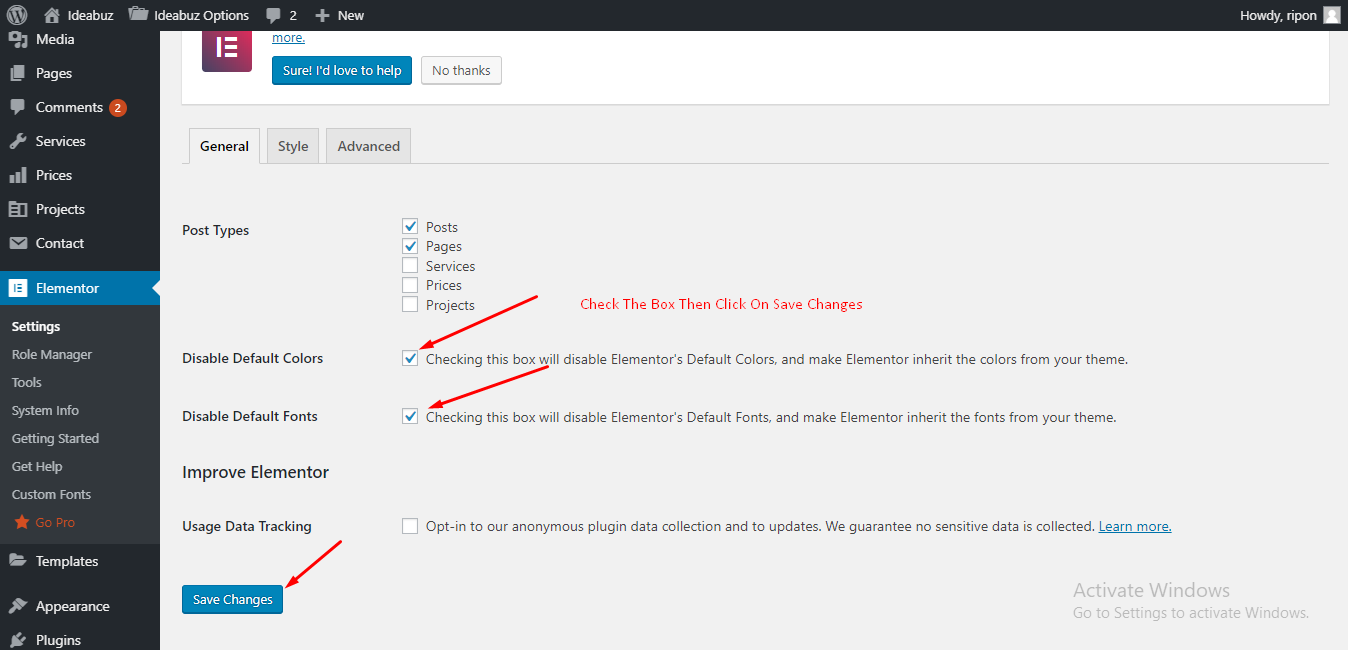
    in reply to: FONT AND STYLE ISSUE #7039

    The theme used font-family: "Rubik", sans-serif; style: bold for heading font and font-family: "Muli", sans-serif; style: normal/regular for body font.

    Best Regards,
    ThemeLooks Support Team

    in reply to: FONT AND STYLE ISSUE #7037

    Please make sure you have checked these options as mentioned in the screenshot https://themelooks.org/documentation/ideabuz/wp-content/uploads/2018/12/Screenshot_3-1.png

    Moreover, we have both options to change typography, manually for every widget from the Elementor or Change the full website’s body typography and header typography from Ideabuz Options -> General http://prntscr.com/qekny4

    Best Regards,
    ThemeLooks Support Team

    in reply to: FONT AND STYLE ISSUE #7035

    We understood the issue. That’s why we referred to check out the post of the documentation of this theme.

    Did you check the last screenshot of the provided link?

    Please Note: It’s not an issue that will fix by changing the typography. It’s an issue of settings up the Elementor.

    However, you will get the option to change the theme body typography and header typography from Ideabuz Options -> General

    Best Regards,
    ThemeLooks Support Team

    in reply to: FONT AND STYLE ISSUE #7033

    Hi Sadhin,

    Please check out the last screenshot to fix your issue to click the below link about import demo data from this theme documentation https://themelooks.org/documentation/ideabuz/import-demo-data/

    Best Regards,
    ThemeLooks Support Team

    in reply to: FONT AND STYLE ISSUE #7030

    Hi Sadhin,

    Please check out the screenshot below to change the typography of a widget.
    http://prntscr.com/qeizar

    Best Regards,
    ThemeLooks Support Team

    in reply to: Wp BAkery cant edit pages well #7026

    Hi Oscar,

    Sorry for the inconvenience.

    The WPbakery front-end editor does not support all of the theme components and it a WPbakery issue. That’s why we recommend using the backend editor.

    Moreover, we use the developer license, because we use WHMCS only for our development purpose, not for support.

    Best Regards,
    ThemeLooks Support Team

    in reply to: Domain Page not pushing Search to WHMCS page. #7023

    Hi WB,

    Please provide your website URL to review the issue.

    Best Regards,
    ThemeLooks Support Team

    in reply to: WHMCS template broken #7020

    Hi Earshad,

    Please extend your support period to get assistance on your inquiry, because your FREE support period was expired on 2019-11-21.

    Best Regards,
    ThemeLooks Support Team

Viewing 15 posts - 2,506 through 2,520 (of 5,045 total)