ThemeLooks Support Team

Forum Replies Created

Viewing 15 posts - 2,581 through 2,595 (of 5,045 total)
  • Author
    Posts
  • in reply to: Page title underline #6845

    Hi Lucas,

    In this issue, you could use the custom CSS below and change the font size based on your needs.

    .logo--content h1 {
        font-size: 18px;
    }

    Best Regards,
    ThemeLooks Support Team

    in reply to: VNut License Code not showing on order dashbaord #6840

    Hi Ignatius,

    We are sorry for the misunderstanding.

    We have deactivated the license. Now you will able to activate the license on your new domain.

    Best Regards,
    ThemeLooks Support Team

    in reply to: VNut License Code not showing on order dashbaord #6838

    Hi Ignatius,

    We are sorry to say that our licensing system works this way and there is no option to activate a license on two domains at a time. Moreover, you don’t need to create a support ticket for this, because there is nothing in our hands to assist on this issue.

    In this issue, you need to deactivate the license from your localhost to activate the license to another domain.

    Best Regards,
    ThemeLooks Support Team

    in reply to: Page title underline #6837

    Please provide your website URL to review the issue live.

    Best Regards,
    ThemeLooks Support Team

    in reply to: need help with some issues please. #6831

    Hi Nawid,

    This theme also has the option to add/remove menus from Appearance -> Menu

    In this issue, you could add a custom menu for the client login. Moreover, the login button will not show on this mobile. Please check out this theme live demo as a reference. The button takes a large space and destroys the header area on the mobile. That’s why it removed from the mobile, based on this theme UX. So, there is no default option to show the button. However, we have listed this in our theme update list to add a option to show/hide the button on the mobile in our future update of the theme.

    Now, there have the only solution is that customize the theme based on your needs and requirements if you want it now.

    Please Note: the theme is all about those that have in the live demo, also it’s all our those features that included in the theme.

    Best Regards,
    ThemeLooks Support Team

    in reply to: VNut License Code not showing on order dashbaord #6829

    Hi There,

    1st, Our team activates the link menually when your credentials were not working.

    2nd, we are sorry to say that there was a system issue and we are working to fix the issue. That’s why our team created a custom license and provided you the license to use.

    3rd, the license you have bought that is a one domain license and you will not able to use the license for more than one domain at a time. In this issue, you need to deactivate the license from the localhost before use/activates it on to another domain.

    Best Regards,
    ThemeLooks Support Team

    in reply to: need help with some issues please. #6828

    In this issue, you need to hire someone else to customize the theme based on your needs and requirements.

    Best Regards,
    ThemeLooks Support Team

    in reply to: Page title underline #6827

    Hi Lucas,

    Could you please provide a screenshot to review the issue?

    Best Regards,
    ThemeLooks Support Team

    in reply to: VNut License Code not showing on order dashbaord #6822

    Hi Ignatius,

    Maybe you didn’t verify your email id after purchase.

    Please check your email id for the activation email and verify your email id to get all access.

    Best Regards,
    ThemeLooks Support Team
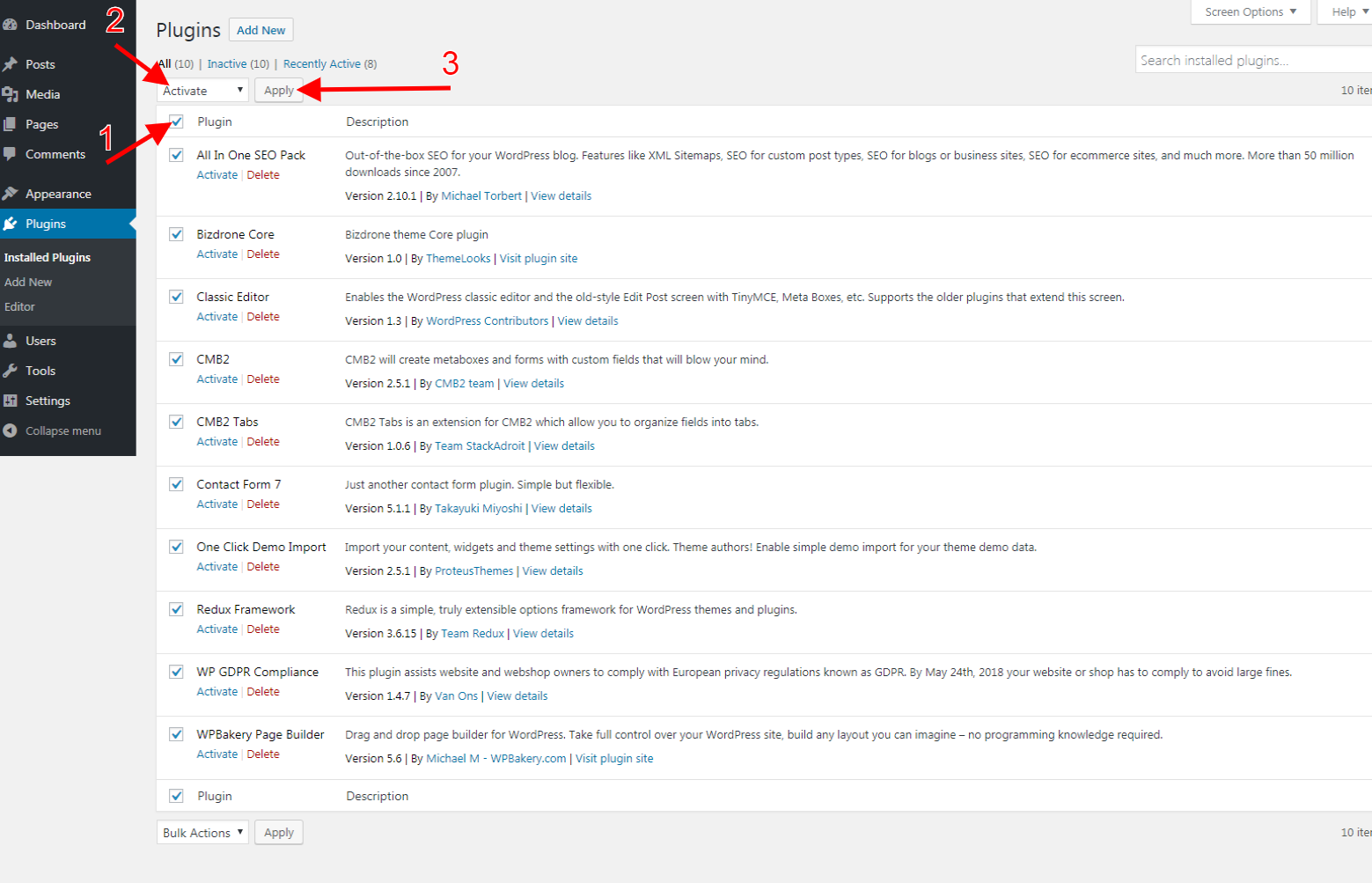
    in reply to: How to Activate Premium Plugins #6820

    After installing the plugins, click on Return to Required Plugins Installer link then select Activate and click on the apply button that shows in the image below.

    Best Regards,
    ThemeLooks Support Team

    in reply to: Issue with Pricing #6819

    Please use this custom CSS to remove the shadow of the texts.

    .banner--content .h2 {
        text-shadow: none;
    }

    Best Regards,
    ThemeLooks Support Team

    in reply to: How to Activate Premium Plugins #6816

    Hi Alex,

    Thanks for reaching out.

    Moreover, you didn’t need to buy or activate a license for the WPBakery plugin. Because the WPBakery is a required plugin to run the theme and without the WPBakery plugin, the theme shortcodes will not work. That’s why we already included the plugin with our theme.

    In this issue, you just need to install the plugin with other required plugins and activate them. When the WPBakery plugin need to update then we will provide an update of our theme to update the WPBakery plugin.

    Best Regards,
    ThemeLooks Support Team

    in reply to: Issue with Pricing #6814

    Hi Bahaa,

    We are sorry to say that there has nothing in our hands to assist you with this issue. Because it’s a default system of WordPress as WordPress follow Ascending order system. That’s why it shows like that.

    Best Regards,
    ThemeLooks Support Team

    in reply to: need help with some issues please. #6813

    Please follow the steps below.

    Remove/disable the pre loading:
    1. Open/edit the header.tpl file
    2. Search for the comment <!-- Preloader Start -->
    3. Remove the markup from <!-- Preloader Start --> to <!-- Preloader End --> http://prntscr.com/psj5uv

    Change the color:
    1. Open/edit the theme-color-1.css file from css\colors folder
    2. Change the color codes with your desire color code

    Best Regards,
    ThemeLooks Support Team

    in reply to: Domain Search Extension help #6806

    Yes, everything is looking alright.

    Please Note: You need to save change after edit and update the URL, then you must have to update the page by clicking the update button of the page to save change everything.

    Best Regards,
    ThemeLooks Support Team

Viewing 15 posts - 2,581 through 2,595 (of 5,045 total)