ThemeLooks Support Team
Hello,
1. All the colors aren’t saved for example I’m trying to edit the header for basic color and it is not saving.
– Please provide a screenshot of where from you tried to edit and your website URL to review the result.
2. I am not able to edit basic pages like the Shop page, My Account Page, and more.
– These are not basic pages. These are WooCommerce default pages for showing the default shop page, login into My Account Page for the front-end dashboard for customers. Also, the Branch Manager, Kitchen Manager, and Delivery Boy pages are not basic pages. Those pages are for the front-end dashboard for the Branch Manager, Kitchen Manager, and delivery boy.
3. The theme is not friendly at all for different languages like for example Hebrew.
– We are sorry to say that the theme does not support RTL. If you need a customization service then you can hire our team.
4. When I import the demo is not showing me the same demo as the original demo preview.
– Please provide your website URL to review the demo data.
5. There is a minimum order and I would like to know if I am able to do it for different locations for example Location that is far away with a minimum order. And the closest location without minimum order.
– We are sorry to say that there are no pre-built options to do those. If you need a customization service based on your needs and requirements then please send a message using our Envato Market (codecanyon) profile contact form to click here https://codecanyon.net/user/themelooks#contact (screenshot as reference https://prnt.sc/10o0iwt ) with your requirements with details to get a quote.
6. I’m trying to remove the Breadcrumb section and when I have hidden it the section does not disappear.
– Please provide a screenshot of where from you tried to edit and your website URL to review the result.
Best Regards,
ThemeLooks Support Team
ThemeLooks Support TeamHello Mario,
We used the Woocommerce default system for payment processing of an order. There is nothing custom there.
If you are using an older version of the plugin then please use the updated plugin.
Best Regards,
ThemeLooks Support Team
ThemeLooks Support TeamHello Salik,
We are sorry to say that we have no idea as we didn’t test it or configure it with woocommerce application. In this case, you can test it by yourself or you can hire our team for testing and customizing it for you.
Please learn more about the Envato Market (codecanyon) item support policy (item support includes & not includes), here https://codecanyon.net/page/item_support_policy
Best Regards,
ThemeLooks Support Team
ThemeLooks Support TeamHello Kemi,
Please watch this video tutorial https://www.youtube.com/watch?v=sF8pUEHwBMw&list=PLbmIKrgYlRbpxbua8PSHZP8-OougCwRrF&index=5
Best Regards,
ThemeLooks Support Team
ThemeLooks Support TeamHello,
We are sorry to say that it’s not the easy work that you are thinking. If you are not a programmer then we don’t recommend customizing the code by yourself. Because it can break the plugin for the wrong customization of codes. If you are a programmer then you could do it yourself without asking us.
However, you need to customize the following files to add a new instructions box and make it works with an order.
http://prntscr.com/1r3xbbd
http://prntscr.com/1r3xh6c
http://prntscr.com/1r3xjem
http://prntscr.com/1r3xoiv
http://prntscr.com/1r3xrcj
Moreover, please learn more about the Envato Market (themeforest) item support policy (item support includes & not includes), here https://codecanyon.net/page/item_support_policy
Best Regards,
ThemeLooks Support Team
ThemeLooks Support TeamHello Salik,
We are sorry to say that there is no mobile application available.
Moreover, could you please let us know what kind of problem are you facing using the foodbook branch system (website) on mobile?
Best Regards,
ThemeLooks Support Team
ThemeLooks Support TeamHello Mihrac,
Please watch this video tutorial https://www.youtube.com/watch?v=sF8pUEHwBMw&list=PLbmIKrgYlRbpxbua8PSHZP8-OougCwRrF&index=5
Best Regards,
ThemeLooks Support Team
ThemeLooks Support TeamHello Salik,
Of course, you need to add your payment details. Because Google API is no more for FREE.
Best Regards,
ThemeLooks Support Team
ThemeLooks Support TeamHello Nick,
Please provide your wp-admin (URL, Username & Password) access using our Envato Market (codecanyon) profile contact form https://codecanyon.net/user/themelooks#contact (screenshot as reference https://prnt.sc/10o0iwt ) including this support topic link as a reference to review the issue to assist.
Best Regards,
ThemeLooks Support Team
ThemeLooks Support TeamHello Shyam,
We have checked the issue on your website using our own created API with the listed steps and permissions that showing in this FoodBook doc https://themelooks.net/documentation/plugin/foodbook/how-to-create-google-api-key/ and we found everything is working perfectly.
Please carefully follow all of the steps of this doc https://themelooks.net/documentation/plugin/foodbook/how-to-create-google-api-key/
Best Regards,
ThemeLooks Support Team
ThemeLooks Support TeamHello Kemi,
Please check out Contact Form 7 FAQs https://contactform7.com/faq/ to configure your contact form in the proper way to get work.
Best Regards,
ThemeLooks Support Team
ThemeLooks Support TeamHello Salik,
When we provide an answer to a topic with proper information and we can understand there is no need for any further assistance then we closed the topic.
Moreover, we have checked the issue on your website using our own created API with the listed steps and permissions that showing in this FoodBook doc https://themelooks.net/documentation/plugin/foodbook/how-to-create-google-api-key/ and we found everything is working perfectly.
That’s why we provided you with the solution and closed the topic. Because it’s all about your created and used API permission issue.
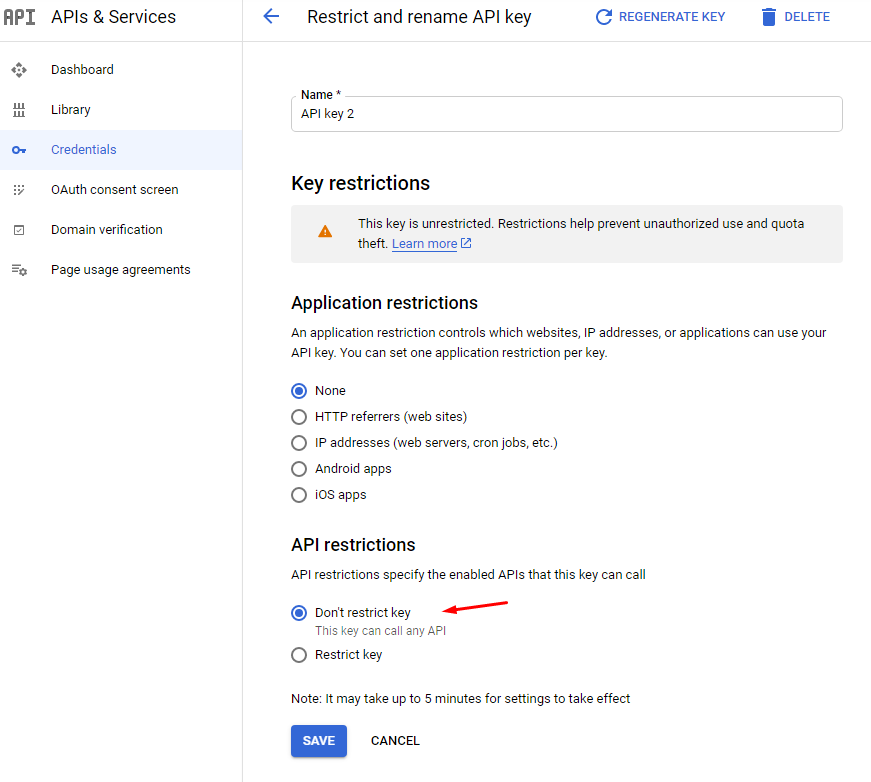
Please carefully follow all of the steps of this doc https://themelooks.net/documentation/plugin/foodbook/how-to-create-google-api-key/ specially this https://themelooks.net/documentation/plugin/foodbook/wp-content/uploads/2020/12/restrict-api.png
Best Regards,
ThemeLooks Support Team
ThemeLooks Support TeamHi,
Please let us know your server PHP version, your WordPress version, and the FoodBook version that you are using to understand your issue to assist.
Best Regards,
ThemeLooks Support Team
ThemeLooks Support TeamHello Shyam,
Please provide your wp-admin (URL, Username & Password) access using our Envato Market (codecanyon) profile contact form https://codecanyon.net/user/themelooks#contact (screenshot as reference https://prnt.sc/10o0iwt ) including this support topic link as a reference to review the issue to assist.
Best Regards,
ThemeLooks Support Team
ThemeLooks Support TeamHello Shyam,
Please set up all of the FoodBook settings properly to get everything to work perfectly.
You can take help from the FoodBook doc https://themelooks.net/documentation/plugin/foodbook/
Best Regards,
ThemeLooks Support Team